

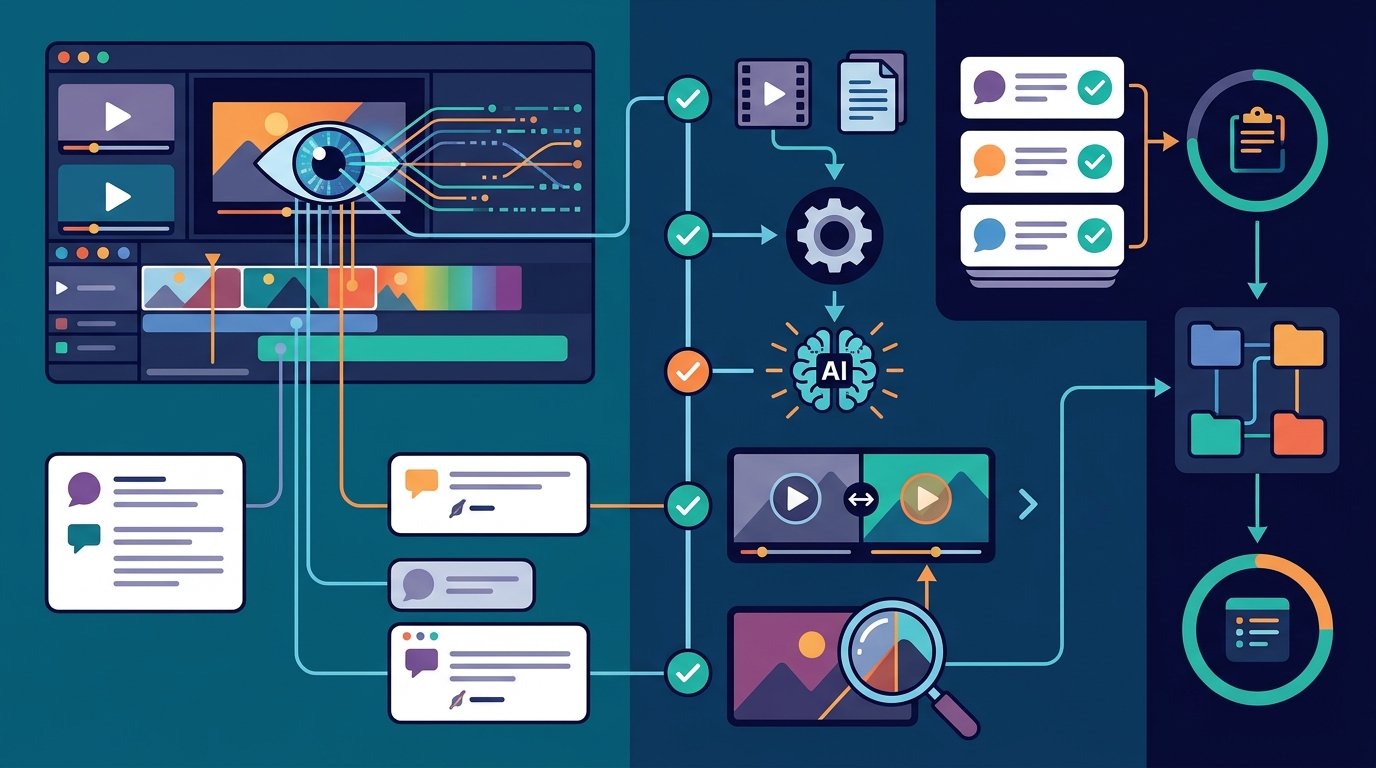
When an AI assistant reviews a video edit against previous notes, it processes the new media file, extracts visual and audio data, and compares it against a stored history of feedback. This automated cross-referencing identifies whether specific changes were made, flags unresolved issues, and provides a summary of the current status. This process reduces manual verification time and ensures that creative decisions are tracked accurately within a unified workspace.
Data Ingestion and Media Parsing
The process begins with the upload of the new video version. The system must first parse the media file to understand its structure. This involves extracting keyframes, audio waveforms, and metadata. The AI does not simply watch the video like a human; it converts the visual and auditory data into a format it can analyze. This step is critical because the quality of the review depends on the accuracy of this initial parsing.
In a platform like FridayHQ, this ingestion is tied directly to the project context. The file is not just stored; it is linked to the specific project and the previous versions. This connection allows the AI to know exactly which file it is comparing against. Without this contextual link, the AI would have no baseline for comparison. The system identifies the version number, the timestamp of the upload, and the associated project ID. This metadata forms the foundation for the subsequent analysis.
Retrieving and Structuring Historical Feedback
Once the new media is parsed, the system retrieves the historical feedback. This is not just a list of comments; it is a structured dataset. Each previous note is associated with a specific timestamp, a region of the frame, or a specific task. The AI retrieves these notes from the project's knowledge base and discussion threads. It organizes them into a checklist of expected changes. This checklist serves as the ground truth for the review.
The retrieval process distinguishes between different types of feedback. Some notes are critical, such as "remove the logo in the background." Others are stylistic, such as "make the color warmer." The AI tags each note with its category and priority. It also notes the status of each item from the previous review. If a note was marked as "resolved" in the last cycle, the AI may deprioritize it unless the new version suggests a regression. If a note was marked as "pending," the AI prioritizes it for verification. This structured retrieval ensures that the AI focuses on what matters most.
In Xander, the AI operations partner, this retrieval is contextual. It understands the project's brief and the specific goals of the current phase. It does not just look for any change; it looks for changes that align with the project's direction. This contextual awareness prevents false positives. For example, if a note said "change the font," the AI knows that a font change is expected. If the font remains the same, it flags it as a missed item. This precision is key to a useful review.
Semantic Comparison and Change Detection
The core of the process is the comparison between the new media and the historical feedback. The AI uses computer vision and natural language processing to perform this comparison. It aligns the new video with the previous version, frame by frame. It then checks each item on the feedback checklist. For visual notes, it analyzes the specific region of the frame. For audio notes, it analyzes the audio track. This alignment is crucial because it allows the AI to verify changes at a granular level.
The comparison is not binary. The AI assigns a confidence score to each verification. If the AI is 95% sure that a logo was removed, it marks it as resolved. If it is only 60% sure, it flags it for human review. This confidence scoring is essential for maintaining trust in the system. It acknowledges the limitations of AI and directs human attention to areas of uncertainty. The AI also detects new issues that were not in the previous feedback. It can identify visual glitches, audio dropouts, or other technical problems that may have been introduced in the new edit.
This step is where the AI demonstrates its value. It can process a ten-minute video in seconds, checking dozens of notes. A human reviewer might take an hour to do the same task. The AI's speed allows for faster iteration cycles. It can provide immediate feedback to the editor, allowing them to make corrections before the next review. This rapid feedback loop accelerates the production process. It reduces the time spent on administrative verification and allows the team to focus on creative work.
Generating the Review Report
After the comparison, the AI generates a review report. This report is not a raw data dump; it is a structured summary. It lists each feedback item, its status, and the AI's confidence score. It highlights items that were resolved, items that were missed, and new issues that were detected. The report is presented in a user-friendly format, often within the project's discussion thread. This allows the team to see the AI's findings alongside the video and the original notes.
The report also includes a summary of the overall progress. It may indicate that 80% of the previous feedback has been addressed. It may highlight the top three remaining issues. This summary helps the team prioritize their next steps. It provides a clear picture of where the project stands. The report is also saved to the project's history, creating a record of the review process. This record is valuable for future reference and for auditing purposes.
In FridayHQ, this report is integrated into the project's workflow. It can trigger tasks for unresolved items. It can update the status of the project. It can notify the team that a new review is available. This integration ensures that the AI's findings are not just informational; they are actionable. The report drives the next steps in the production process. It keeps the project moving forward.
Implications for Creative Workflows
The step-by-step process of AI review has significant implications for creative workflows. It reduces the administrative burden on producers and editors. It ensures that feedback is tracked and addressed. It accelerates the production cycle. It improves the quality of the final output by catching issues that might be missed by a human reviewer. This process is not a replacement for human judgment; it is a tool that enhances it.
The use of AI in this way requires a shift in how teams work. They must provide clear, structured feedback. They must trust the AI's confidence scores. They must use the AI's reports to drive their decisions. This shift requires training and adaptation. However, the benefits are substantial. Teams can spend more time on creative work and less time on administrative tasks. They can iterate faster and produce higher-quality content. This is the future of media operations.
For teams using FridayHQ, this process is built into the platform. It is not an add-on; it is a core feature. It is designed to work with the rest of the platform, including tasks, storage, and publishing. This integration ensures a seamless workflow. The AI is not a separate tool; it is a partner in the creative process. It helps the team move from idea to execution more efficiently. This is the value of a unified workspace.
Key Takeaways
- AI review begins with media parsing, extracting visual and audio data from the new video version.
- Historical feedback is retrieved and structured into a checklist of expected changes.
- The AI performs a semantic comparison, aligning the new video with the previous version and checking each feedback item.
- Confidence scores are assigned to each verification, flagging uncertain items for human review.
- A structured report is generated, summarizing resolved items, missed items, and new issues.
- This process reduces administrative burden and accelerates the production cycle.
- Integration with a unified workspace ensures that AI findings are actionable and drive the next steps.
Frequently Asked Questions
How long does the AI review process take?
The AI review process typically takes a few seconds to a few minutes, depending on the length and complexity of the video. The parsing and comparison steps are automated and fast. The time required is significantly less than a manual review, allowing for rapid iteration.
Can the AI detect new issues that were not in the previous feedback?
Yes, the AI can detect new issues such as visual glitches, audio dropouts, or technical problems. It analyzes the entire video, not just the areas mentioned in the previous feedback. This allows it to catch issues that might have been introduced in the new edit.
How accurate is the AI's verification of changes?
The AI's accuracy depends on the clarity of the feedback and the quality of the media. It assigns a confidence score to each verification. High-confidence items are marked as resolved, while low-confidence items are flagged for human review. This ensures that the team can trust the AI's findings.
Does the AI replace human reviewers?
No, the AI does not replace human reviewers. It is a tool that enhances human judgment. It handles the administrative verification of changes, allowing humans to focus on creative decisions. The AI provides a summary of the status, but the final approval is always a human decision.
How is the AI integrated into the project workflow?
The AI is integrated into the project's discussion thread and task management. Its reports are presented alongside the video and the original notes. It can trigger tasks for unresolved items and update the project status. This integration ensures that the AI's findings are actionable and drive the next steps in the production process.
Conclusion
The step-by-step process of AI review is a powerful tool for modern media teams. It automates the verification of changes, reduces administrative burden, and accelerates the production cycle. By integrating this process into a unified workspace, teams can ensure that their creative work is tracked, reviewed, and approved efficiently. FridayHQ provides the platform for this process, offering a seamless experience for planning, creating, and reviewing media assets. To see how this works in action, you can book a demo and explore the capabilities of the AI operations partner.